
Download Statuzer – Free Cross‑Platform Twitter Client for Windows
Overview
Statuzer positions itself as a modern, versatile Twitter client built specifically for Windows, yet its design philosophy embraces cross‑platform sensibilities that appeal to power users, social‑media managers, and casual tweeters alike. At its core, Statuzer provides a single, consolidated workspace where you can log into multiple Twitter accounts without the need to constantly sign‑out and sign‑in. This multi‑account capability eliminates the friction that most native Twitter interfaces impose, allowing you to switch contexts instantly while keeping each timeline, notification stream, and direct‑message inbox neatly separated.
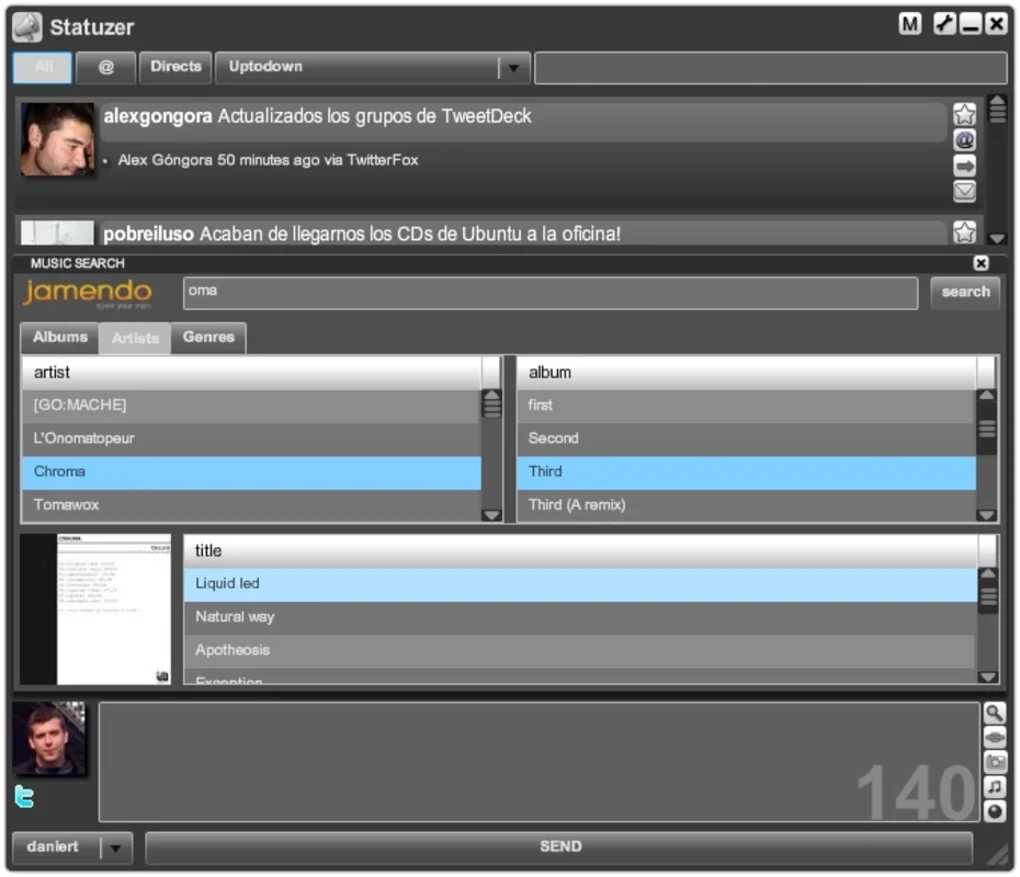
Beyond the basic timeline view, Statuzer enriches the Twitter experience with built‑in utilities such as a URL shortener, direct image uploads, and a music‑recommendation engine that suggests tracks based on tweet content or hashtags. These tools turn the client into a mini‑content‑creation suite, letting you embed media without leaving the application. Additionally, the client introduces user groups and search‑filter groups, which are essentially saved filters that let you categorize incoming tweets by keywords, mentions, or custom tags.
This feature is a boon for professionals who monitor brand sentiment, track industry trends, or simply want to keep personal and professional feeds distinct. The interface is highly customizable: you can alter the colour palette, choose between light or dark themes, and even replace notification sounds with your own audio files. Such personalisation ensures that Statuzer feels like an extension of your workflow rather than a generic third‑party app.
Standard Twitter actions—replies, retweets, likes, and direct messages—are all supported, and the client stays up‑to‑date with Twitter’s API changes thanks to regular automatic updates. In short, Statuzer offers a comprehensive, secure, and free solution for anyone looking to manage multiple Twitter accounts efficiently while enjoying a richer set of auxiliary features that go beyond what the official Twitter app provides.
Key Features
- Multi‑Account Management: Seamlessly add, switch, and monitor up to 10 Twitter accounts from a single dashboard.
- Integrated URL Shortener: Convert long links into compact, trackable URLs without leaving the client.
- Direct Image & Video Uploads: Drag‑and‑drop support for photos, GIFs, and short videos, with automatic compression for faster posting.
- Music Recommendation Engine: Smart suggestions of songs or playlists based on tweet hashtags and trending topics.
- User Groups & Search‑Filter Groups: Create custom groups (e.g., “Clients”, “Tech News”) and saved search filters to instantly surface relevant tweets.
- Customisable Interface: Choose from pre‑built themes or design your own colour scheme, font size, and notification sounds.
- Full Twitter Functionality: Supports replies, retweets, quote‑tweets, likes, direct messages, and list management.
- Real‑Time Notifications: Desktop alerts for mentions, DMs, and keyword triggers, with optional silent mode for focused work.
- Secure Authentication: OAuth 2.0 integration ensures your credentials are never stored locally.
- Automatic Updates: Background update service keeps the client aligned with Twitter API changes and security patches.
Installation & Usage Instructions
Getting started with Statuzer is straightforward, even for users who are new to third‑party Twitter clients. First, visit the official Statuzer download page and click the “Download for Windows” button. The installer is a lightweight .exe file (approximately 35 MB) that is digitally signed, guaranteeing a secure and tamper‑free installation.
Once the file is downloaded, double‑click to launch the wizard. The setup process includes three simple steps: accept the End‑User License Agreement, choose an installation directory (the default location works for most users), and decide whether to create a desktop shortcut. After confirming your choices, click “Install” and wait a few moments while the files are copied and the required registry entries are created.
When you launch Statuzer for the first time, you’ll be greeted by a clean onboarding screen that walks you through the OAuth authentication flow. Click “Add Account,” and a secure browser window will open, prompting you to log in to your Twitter credentials. Because Statuzer uses OAuth 2.0, your password never touches the client; instead, Twitter returns an access token that Statuzer stores locally in an encrypted format. Repeat this step for each additional account you wish to manage. After the accounts are linked, you can customise the layout by dragging the account tabs to reorder them, or by creating groups via the “New Group” button in the sidebar.
Using the client on a daily basis is intuitive. The left‑hand navigation panel houses your account list, groups, and filter shortcuts. Selecting a group filters the main timeline to only display tweets that match the group’s criteria—ideal for focusing on specific topics without sifting through unrelated chatter. The compose box at the top of each timeline supports rich text, emoji insertion, and direct media attachment. If you want to shorten a link, simply paste it into the compose area and click the “Shorten” icon; Statuzer will replace it with a compact URL and display click‑through statistics in the tweet details view.
For power users, the “Settings” menu (gear icon) offers advanced options such as custom notification sounds, API rate‑limit monitoring, and the ability to export your group definitions as a JSON file for backup or sharing with teammates. The client also provides a “Help Center” link that directs you to an online knowledge base covering troubleshooting, feature requests, and community forums. All updates are delivered silently in the background, but you can manually check for the latest version via the “Check for Updates” button located at the bottom of the Settings panel.
Compatibility, Pros & Cons
Statuzer is engineered exclusively for the Windows operating system, supporting Windows 10 (64‑bit) and Windows 11. The application leverages the modern WinUI framework, ensuring smooth performance on both high‑end workstations and modest laptops. While the core client runs only on Windows, the developers have announced plans to release macOS and Linux builds in the upcoming year, based on user demand.
The current Windows version is compatible with both Intel and ARM processors, and it can run side‑by‑side with other Twitter tools without conflict. System requirements are modest: a minimum of 2 GB RAM, 200 MB of free disk space, and a DirectX 11‑compatible graphics card for UI animations. No additional runtime (such as .NET) needs to be installed, as Statuzer bundles all necessary libraries within its installer.
Pros
- Effortless management of multiple Twitter accounts from a single interface.
- Robust set of built‑in utilities (URL shortener, media uploader, music recommendations).
- Highly customisable UI that adapts to personal branding or corporate style guides.
- Secure OAuth authentication ensures credentials are never stored in plain text.
- Automatic background updates keep the client aligned with Twitter’s API changes.
- Free to download and use, with no hidden subscription fees.
- Lightweight installation footprint and low system resource consumption.
Cons
- Currently limited to Windows; macOS and Linux users must wait for future releases.
- No native mobile app, so on‑the‑go management requires the web version of Twitter.
- Advanced filtering relies on manual keyword entry; no AI‑driven sentiment analysis yet.
- Music recommendation feature may not appeal to all users and occasionally suggests unrelated tracks.
- While the client is free, premium support options are not available.
Statuzer delivers a compelling blend of multi‑account management and auxiliary tools that make everyday Twitter usage more efficient. The UI is clean, the feature set is generous for a free app, and the Windows‑only focus means the software runs smoothly without unnecessary bloat. For social‑media managers handling several brand accounts, Statuzer is a practical, secure, and cost‑effective alternative to juggling multiple browser tabs or mobile devices. The main drawback remains its platform limitation, but for Windows‑centric teams the client offers a clear productivity boost.
Frequently Asked Questions
Is Statuzer completely free or are there hidden costs?
Statuzer is free to download and use. All core features—including multi‑account support, URL shortening, and media uploads—are available at no charge. The developers have announced that future premium add‑ons may be offered, but as of the current version there are no subscription fees or hidden in‑app purchases.
Can I use Statuzer on macOS or Linux?
At present Statuzer is built for Windows 10 and Windows 11 only. The development team has indicated that macOS and Linux versions are on the roadmap, with beta releases expected in early 2026.
How does Statuzer handle my login credentials?
Statuzer uses OAuth 2.0 authentication, which means your password is never stored or transmitted by the application. After you log in through Twitter’s official login page, an encrypted access token is saved locally, providing secure, token‑based access to your accounts.
What are “User Groups” and how can they improve my workflow?
User Groups let you categorize accounts (e.g., “Personal”, “Work”, “Clients”) and switch between them with a single click. Combined with Search‑Filter Groups, you can create saved filters that automatically display tweets containing specific keywords, hashtags, or mentions, dramatically reducing the time spent scrolling through unrelated content.
Does Statuzer support automatic updates?
Yes. Statuzer includes a background update service that checks for new releases every 24 hours. When an update is available, it is downloaded silently and applied the next time you restart the application, ensuring you always have the latest features and security patches.
Conclusion & Call to Action
If you’re a social‑media professional, a brand manager, or simply a power user who juggles multiple Twitter identities, Statuzer offers a polished, secure, and feature‑rich environment that eliminates the hassle of constant log‑ins and fragmented workflows. Its combination of multi‑account handling, built‑in utilities like URL shortening and media uploads, and the ability to create custom groups makes it a standout free alternative to the official Twitter app. While the Windows‑only limitation may deter some, the lightweight installer, regular automatic updates, and transparent OAuth security provide ample reasons to give Statuzer a try today. Download Statuzer now from the official site, set up your accounts, and experience a smoother, more organized Twitter experience that lets you focus on content rather than navigation.







